

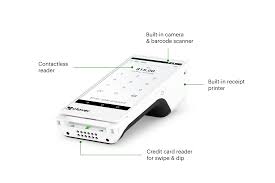
Introduction to Clover POS, Clover Mini, and Clover Flex
Every successful business needs a seamless payment system to keep customers happy and sales flowing. Clover POS, Clover Mini, and Clover Flex are versatile tools that offer everything from payment processing to inventory management and business insights. Whether you run a cafe, retail store, or food truck, Clover provides the tools you need to streamline daily operations.
With Clover POS, you get a powerful, all-in-one system designed for large businesses. The Clover Mini offers a compact option for small businesses with limited counter space, and Clover Flex delivers on-the-go payment flexibility for mobile businesses. Each of these systems comes with advanced features for processing payments, managing customers, and tracking sales. This guide will walk you through the key features, benefits, and differences between these three essential POS systems.
What is Clover POS?
Clover POS is a full-sized point-of-sale system designed to handle large business operations. It allows business owners to manage everything from payments to inventory, employee scheduling, and customer data, all from a single, easy-to-use device.
Key Features of Clover POS
- Comprehensive Business Management: Manage inventory, process payments, track employee hours, and monitor sales from a single system.
- Flexible Payment Methods: Accept payments via chip, swipe, tap, and mobile wallets like Google Pay and Apple Pay.
- Customizable Apps: Access industry-specific apps for restaurant management, customer loyalty programs, and more.
- Employee Management: Track employee hours and assign specific roles, allowing for better team management.
- Cloud-Based Data Management: Access reports, sales insights, and customer data from anywhere.
Best For: Retail stores, full-service restaurants, cafes, and large businesses that require advanced tracking, reporting, and customer management.
What is Clover Mini?
The Clover Mini is a smaller, more compact version of the Clover POS system. It offers many of the same features as the full-sized POS but takes up less counter space. It’s an excellent choice for small businesses, cafes, and salons that have limited room but still need a robust POS system.
Key Features of Clover Mini
- Space-Saving Design: Smaller footprint compared to Clover POS, making it ideal for small stores, cafes, and salons.
- Built-in Receipt Printer: Print customer receipts directly from the device without requiring an external printer.
- Full Payment Acceptance: Accepts chip, swipe, tap (NFC), and mobile payments like Google Pay, Apple Pay, and Samsung Pay.
- Customizable POS Features: Use apps from the Clover App Market to expand features for inventory tracking, employee management, and customer loyalty.
- Cloud-Based Management: Track business reports, customer information, and payment data remotely via the cloud.
Best For: Small businesses, cafes, and stores with limited counter space but a need for advanced payment processing capabilities.
What is Clover Flex?
Clover Flex is a handheld, portable POS device designed to support mobile payments and on-the-go transactions. Its lightweight design, built-in printer, and wireless capabilities make it ideal for food trucks, delivery services, and mobile service providers.
Key Features of Clover Flex
- Portable and Mobile: Take payments at tables, on delivery routes, or at pop-up events.
- Payment Versatility: Accept chip, swipe, NFC contactless payments, and mobile wallets like Apple Pay and Google Pay.
- Built-in Receipt Printer: Print receipts instantly from the device, saving you the cost of additional hardware.
- Wireless and Battery-Powered: No need for power cords; Clover Flex operates on a rechargeable battery for complete portability.
- Cloud Data Access: Access transaction history, customer details, and business reports remotely.
Best For: Mobile businesses, food trucks, delivery services, and pop-up stores that need payment flexibility.
Comparison of Clover POS, Clover Mini, and Clover Flex
Here’s a quick comparison of Clover POS, Clover Mini, and Clover Flex to help you choose the right system for your business:
| Feature | Clover POS | Clover Mini | Clover Flex |
|---|---|---|---|
| Size | Full-sized system | Compact countertop | Portable handheld |
| Mobility | Stationary | Stationary | Fully portable |
| Payment Methods | Chip, Swipe, NFC | Chip, Swipe, NFC | Chip, Swipe, NFC |
| Receipt Printer | External printer | Built-in printer | Built-in printer |
| Cloud Access | Yes | Yes | Yes |
| Battery Life | Plug-in only | Plug-in only | Rechargeable battery |
| Use Case | Retail, Restaurants | Small stores, Cafes | Mobile payments |
Benefits of Using Clover POS, Clover Mini, and Clover Flex
Regardless of which system you choose, Clover POS, Clover Mini, and Clover Flex provide several essential benefits.
1. Accept Multiple Payment Methods
All three systems accept payments via chip, swipe, and contactless methods like Apple Pay and Google Pay. This ensures customers can pay the way they prefer.
2. Streamline Sales and Payments
Reduce checkout time with seamless, fast payment processing. Clover Flex allows payments at the table, while Clover Mini enables faster in-store checkouts.
3. Cloud-Based Business Management
Business owners can access reports, inventory levels, and employee activity from anywhere via the Clover Dashboard. This real-time access offers better control and insight.
4. Portable Payments for Mobile Businesses
Clover Flex is ideal for mobile services, delivery businesses, and events, providing the ability to accept payments on the go. This level of flexibility can boost sales and customer satisfaction.
5. Enhanced Security and Compliance
Clover devices use end-to-end encryption, tokenization, and PCI compliance to ensure secure transactions. This protects customer data and builds trust.
Which Clover System is Best for Your Business?
Here’s a simple guide to help you choose the best system for your business:
- Choose Clover POS if you manage a large restaurant, retail store, or service-based business with complex payment and tracking needs.
- Choose Clover Mini if you need a smaller device for tight spaces, such as cafes, salons, and boutique shops.
- Choose Clover Flex if you run a mobile business, food truck, or delivery service where flexibility and portability are crucial.
Each system serves a specific purpose, but all three offer payment flexibility, cloud-based tracking, and enhanced customer experience.
Frequently Asked Questions (FAQs)
1. Can I use Clover Flex for mobile payments on the go?
Yes, Clover Flex is designed for mobile use. It has a rechargeable battery and works wirelessly, making it ideal for food trucks, pop-up events, and mobile businesses.
2. Do Clover POS systems support Apple Pay and Google Pay?
Yes, all three systems — Clover POS, Clover Mini, and Clover Flex — accept contactless payments, including Apple Pay and Google Pay.
3. Can I manage employee schedules using Clover POS?
Yes, Clover POS offers employee tracking and management features, such as clock-in/clock-out tracking, shift schedules, and role assignments.
4. Are Clover systems secure?
Yes, Clover devices use end-to-end encryption, PCI compliance, and tokenization to secure payment data and protect customers from fraud.
5. Can I print receipts from Clover Mini and Clover Flex?
Yes, both Clover Mini and Clover Flex have built-in receipt printers, so you won’t need additional hardware.
Conclusion
Clover POS, Clover Mini, and Clover Flex provide the essential tools businesses need to process payments, track sales, and manage customer interactions. From the robust Clover POS for large-scale businesses to the portable Clover Flex, there’s a solution for every need.
Whether you operate a food truck, a busy retail store, or a cozy cafe, these systems help you run your business smoothly. Their ability to accept chip, swipe, and NFC payments, combined with their cloud-based management and security features, makes them a must-have for modern businesses.
Choose the right Clover system for your business and enjoy faster payments, better inventory tracking, and seamless business operations.
