

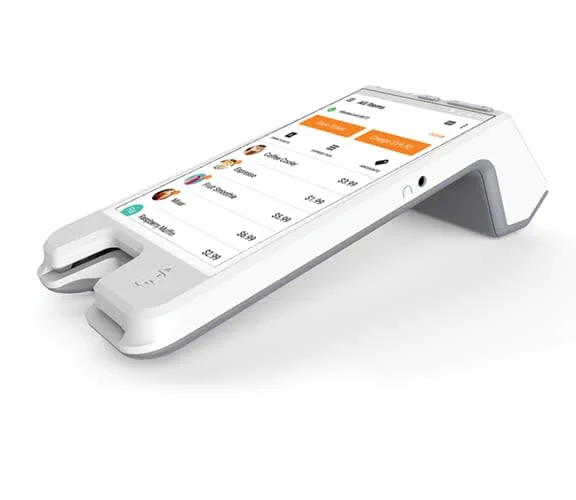
What is Pay Anywhere POS?
Businesses today require modern payment solutions that are fast, secure, and flexible. The Pay Anywhere POS system offers all these capabilities and more. It allows businesses to accept payments through credit cards, debit cards, contactless payments, and mobile wallets like Apple Pay and Google Pay.
PayAnywhere POS is designed for retail stores, restaurants, mobile vendors, and service providers. With a simple interface, mobile payment capabilities, and cloud-based tracking, it empowers business owners to process payments faster and manage their daily operations with ease.
This guide explores its key features, benefits, and how to set up Pay Anywhere POS to streamline your business payments and improve customer satisfaction.
1. Key Features of PayAnywhere POS
Pay Anywhere POS comes with a host of features designed to make payment processing simple, secure, and efficient. Here are the essential features you should know:
1. Multi-Payment Acceptance
Accept payments in multiple formats, including:
- Credit and debit cards (EMV chip, swipe, and magstripe)
- Contactless payments (NFC payments) like Apple Pay and Google Pay
- Mobile payments via smartphones and digital wallets
By supporting multiple payment methods, Pay Anywhere POS caters to all customer preferences, ensuring a smoother and faster checkout experience.
2. Cloud-Based Data and Reporting
Access your sales data and inventory in real time, from any location. With cloud-based reporting, you can track transactions, generate sales reports, and monitor daily performance from your smartphone, tablet, or desktop.
3. Inventory Management
Keep track of product availability and receive low-stock alerts. This feature helps you avoid stockouts and ensures that popular items are always available. The system allows for product categorization, making it easy to search for items during checkout.
4. Customizable Receipts
Personalize receipts with your company logo, business information, and custom messages. Customers can receive their receipts via email or SMS, providing a contactless and eco-friendly checkout option.
5. Employee Management
PayAnywhere POS allows you to assign user permissions, track employee activity, and monitor shift performance. It also tracks which employees are processing transactions, making it easier to measure individual productivity.
6. Secure Payment Processing
With features like EMV chip technology, end-to-end encryption, and tokenization, PayAnywhere POS protects your customers’ data from fraud and theft. This ensures the safety and security of every transaction.
These features make Pay Anywhere POS a comprehensive solution for businesses seeking smarter payment processing.
2. Benefits of PayAnywhere POS for Businesses
Using PayAnywhere POS can significantly improve your business operations, increase revenue, and enhance customer experience. Here’s how:
1. Faster Payment Processing
With support for chip cards, NFC payments, and mobile wallets, the system ensures faster payment processing. This reduces customer wait times and allows businesses to serve more customers in less time.
2. Flexible Payment Options
Today’s customers prefer using multiple payment options. PayAnywhere POS supports credit, debit, contactless, and mobile payments, giving customers the flexibility to pay how they want.
3. Real-Time Sales Insights
With access to cloud-based reporting, you can track real-time sales data. This helps you identify popular products, manage stock, and make smarter business decisions.
4. Enhanced Security
Data breaches can be costly for businesses. PayAnywhere POS protects your transactions with advanced encryption, tokenization, and EMV chip support, reducing the risk of fraud and chargebacks.
5. Cost-Effective Pricing
Unlike other POS systems, PayAnywhere has no monthly fees. You only pay for each transaction, making it a cost-effective option for small and medium-sized businesses.
6. Remote Business Management
Track sales, monitor employee activity, and review inventory from any location. Cloud-based functionality gives you complete control, even when you’re not on-site.
These benefits make Pay Anywhere POS the go-to choice for businesses looking to streamline payments and enhance their operational efficiency.
3. How to Set Up and Use PayAnywhere POS
Setting up PayAnywhere POS is simple and doesn’t require any technical expertise. Follow these easy steps to get started:
1. Choose Your PayAnywhere POS Device
Pick the right device for your business. PayAnywhere offers multiple devices, including:
- PayAnywhere Smart Terminal – A portable, touchscreen device for processing payments at the counter or on the go.
- PayAnywhere Smart POS+ – A larger, full-featured POS system for higher-volume businesses.
- PayAnywhere Card Reader – A compact reader that connects to a smartphone or tablet, making it ideal for mobile businesses.
2. Create Your PayAnywhere Account
Visit the PayAnywhere website and sign up for an account. Provide your business details, link your bank account, and follow the verification process.
3. Download the PayAnywhere App
If you’re using a tablet or smartphone, download the PayAnywhere app from the App Store or Google Play. For Smart POS+ and Smart Terminal, the app comes pre-installed.
4. Add Products to Your Inventory
Input your product details, prices, and categories. This allows your employees to quickly search for products at checkout, making it easy to complete transactions.
5. Connect Payment Devices
Connect your card reader, smart terminal, or smart POS to your Wi-Fi network. Run a test transaction to ensure everything is set up correctly.
6. Train Employees
Train your team on how to use the system for payments, product searches, and customer transactions. The user-friendly interface makes it easy for employees to learn.
Once your system is up and running, you’re ready to start processing payments. The setup process takes less than a day, and support is available if you need assistance.
4. Is PayAnywhere POS Right for Your Business?
Before choosing Pay Anywhere POS, consider the type of business you operate and your payment needs. Here’s why this system might be the right fit for you:
1. Business Type
This POS system works for retail stores, restaurants, coffee shops, and mobile businesses like food trucks, pop-up shops, and market vendors.
2. Budget-Friendly Pricing
PayAnywhere has no software fees or contracts. You only pay per transaction, making it a cost-effective solution for small and growing businesses.
3. Scalability
If you plan to grow your business, PayAnywhere can scale with you. It supports multi-location management, so you can track sales and inventory from one dashboard.
4. Payment Flexibility
If you want to offer customers more ways to pay, Pay Anywhere POS makes it possible. It accepts chip cards, mobile wallets, and contactless payments, giving your customers a smooth checkout experience.
5. Ease of Use
PayAnywhere is designed with simplicity in mind. From its intuitive interface to the easy setup process, it’s a POS system that business owners can master in no time.
If you’re looking for a secure, affordable, and flexible POS system, Pay Anywhere POS could be the perfect fit for your business.
Conclusion: Take Control of Business Payments with PayAnywhere POS
A Pay Anywhere POS system is an essential tool for businesses that want to simplify payment processing and streamline operations. Its ability to accept chip cards, contactless payments, and mobile wallets ensures that you’re prepared to meet customer payment preferences.
With inventory tracking, employee management, and cloud-based reporting, PayAnywhere POS gives you complete control of your business operations. It also scales with your business, making it ideal for single-location stores and multi-location enterprises alike.
If you’re ready to modernize your payment system, Pay Anywhere POS is the perfect choice. Its low cost, ease of use, and advanced features ensure that your business stays ahead of the competition. Start your journey toward faster, safer payments today.
